
Attendance Sheet in Excel क्या है?
Attendance Sheet एक ऐसी Worksheet होती है जिसमें कर्मचारियों (Employees) या विद्यार्थियों (Students) की दैनिक उपस्थिति (Attendance) दर्ज की जाती है।
Microsoft Excel में Attendance Sheet बनाकर आप:
- Present (P)
- Absent (A)
- Leave (L)
- Half Day (HD)
का रिकॉर्ड आसानी से रख सकते हैं।
Attendance Sheet का मुख्य उद्देश्य उपस्थिति रिकॉर्ड को व्यवस्थित और स्वचालित रूप से प्रबंधित करना है।
Attendance Sheet क्यों उपयोग की जाती है?
Attendance Sheet के फायदे:
✅ Employee Attendance Tracking
✅ Student Attendance Management
✅ Salary Calculation
✅ Leave Management
✅ Attendance Percentage Calculation
✅ Monthly Reporting
Attendance Sheet में कौन-कौन सी जानकारी होती है?
| Employee ID | Employee Name | Department | 1 | 2 | 3 | 4 | 5 | Total Present |
|---|---|---|---|---|---|---|---|---|
| 101 | Rahul | Accounts | P | P | A | P | P | 4 |
Attendance Status Codes
| Code | Meaning |
|---|---|
| P | Present |
| A | Absent |
| L | Leave |
| HD | Half Day |
| WO | Weekly Off |
| H | Holiday |
Employee Attendance Sheet Format
| Emp ID | Name | 1 | 2 | 3 | 4 | 5 | Total Present |
|---|---|---|---|---|---|---|---|
| 101 | Rahul | P | P | A | P | P | 4 |
| 102 | Amit | P | A | P | P | P | 4 |
| 103 | Neha | P | P | P | P | P | 5 |
Excel में Attendance Sheet कैसे बनाएं?
Step 1
Columns बनाएं:
Employee ID
Employee Name
Department
1 to 31 (Dates)
Total Present
Attendance %
Step 2
कर्मचारियों के नाम दर्ज करें।
Step 3
प्रत्येक दिन Attendance भरें:
P = Present
A = Absent
L = Leave
Step 4
Attendance Total निकालें।
Present Days Count Formula
यदि Attendance D2:AH2 में है:
=COUNTIF(D2:AH2,"P")Formula Explanation
COUNTIF Function “P” की संख्या गिनेगा।
Absent Count Formula
=COUNTIF(D2:AH2,"A")Leave Count Formula
=COUNTIF(D2:AH2,"L")Attendance Percentage Formula
यदि Total Working Days 26 हैं:
=(AI2/26)*100या
=AI2/26Percentage Format Apply करें।
Student Attendance Sheet Example
| Roll No | Student Name | Total Classes | Present | Attendance % |
|---|---|---|---|---|
| 1 | Rahul | 30 | 28 | 93.33% |
| 2 | Amit | 30 | 24 | 80% |
Formula:
=(D2/C2)*100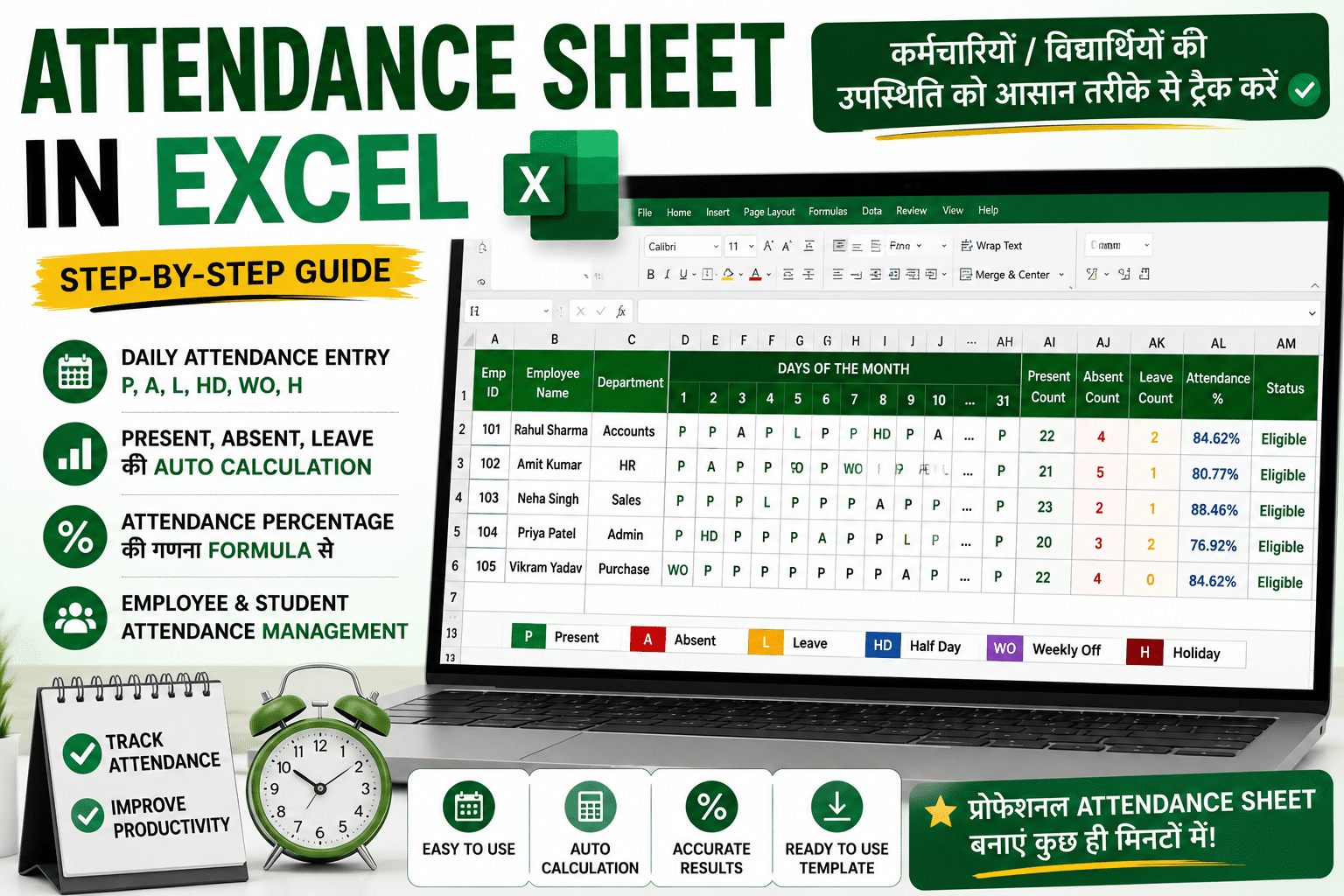
Attendance Eligibility Formula
यदि Attendance 75% या अधिक है:
=IF(E2>=75,"Eligible","Not Eligible")Output
| Attendance % | Status |
|---|---|
| 85% | Eligible |
| 65% | Not Eligible |
Salary Based Attendance Calculation
यदि Employee की Monthly Salary ₹30,000 है और उसने 24 दिन कार्य किया:
Formula:
=(30000/26)*24Result
₹27,692Attendance Sheet में Conditional Formatting
Conditional Formatting का उपयोग करके:
Present
🟢 Green Color
Absent
🔴 Red Color
Leave
🟡 Yellow Color
दिखाया जा सकता है।
Attendance Sheet में Data Validation
Dropdown List बनाएं:
P
A
L
HD
WO
H
Benefits
- Typing Errors कम
- Faster Entry
- Standard Format
HR Department के लिए Attendance Sheet
Attendance Sheet का उपयोग:
- Payroll Processing
- Leave Management
- Overtime Calculation
- Monthly Salary Processing
में किया जाता है।
School Attendance Sheet
Schools और Colleges में:
- Daily Attendance
- Monthly Attendance
- Annual Attendance
Record करने के लिए Excel Attendance Sheet का उपयोग किया जाता है।
Attendance Sheet में उपयोगी Formulas
COUNTIF
=COUNTIF(D2:AH2,"P")IF Formula
=IF(AI2>=75,"Eligible","Not Eligible")SUM Formula
=SUM(B2:B20)AVERAGE Formula
=AVERAGE(B2:B20)Attendance Sheet बनाते समय होने वाली सामान्य गलतियाँ
❌ Wrong Status Codes
P की जगह Present लिखना और कहीं P लिखना।
❌ Formula Range गलत चुनना
Attendance Days पूरी Range में शामिल करें।
❌ Percentage गलत निकालना
Working Days सही दर्ज करें।
❌ Manual Counting
COUNTIF का उपयोग करें।
Professional Attendance Sheet में क्या होना चाहिए?
✅ Employee Master
✅ Attendance Entry
✅ Present Count
✅ Leave Count
✅ Attendance %
✅ Salary Calculation
✅ Monthly Summary
Frequently Asked Questions (FAQ)
Attendance Sheet क्या होती है?
Attendance Sheet कर्मचारियों या विद्यार्थियों की उपस्थिति रिकॉर्ड करने के लिए बनाई जाती है।
Excel में Present Days कैसे Count करते हैं?
=COUNTIF(D2:AH2,”P”)
Attendance Percentage कैसे निकालते हैं?
=Present Days / Total Working Days * 100
क्या Excel में Automatic Attendance Sheet बनाई जा सकती है?
हाँ, Formulas और Data Validation की सहायता से।
Attendance Sheet HR के लिए क्यों महत्वपूर्ण है?
क्योंकि Salary, Leave और Payroll Processing Attendance पर आधारित होती है।
Download Free Attendance Sheet Template
🎁 Free Premium Attendance & Payroll Excel Template Download
Employee Attendance, Salary Calculation और Dashboard सहित Professional Excel Template प्राप्त करें।
निष्कर्ष
Attendance Sheet Excel की सबसे उपयोगी Practical Worksheets में से एक है। चाहे आप HR Professional हों, Accountant हों या Teacher, Excel Attendance Sheet की सहायता से आप उपस्थिति रिकॉर्ड, Percentage Calculation और Salary Processing को आसानी से Manage कर सकते हैं।
Excel सीखने के लिए यह भी पढ़ें
👉 Excel क्या है?
👉 SUM Formula in Excel क्या है?
👉 IF Formula in Excel क्या है?
👉 VLOOKUP Formula in Excel कैसे काम करता है?
👉 Salary Sheet in Excel कैसे बनाएं?
👉 Excel Shortcut Keys PDF Download
👉 Advanced Excel Course in Hindi