
अगर आप inventory business (shop, trading, manufacturing) करते हैं, तो Stock Item Creation सीखना बहुत जरूरी है।
इस पोस्ट में हम आसान भाषा में समझेंगे:
👉 Stock Item क्या होता है
👉 TallyPrime में Stock Item कैसे बनाएं
👉 Units, Godown और GST settings
👉 Common mistakes और best tips
Stock Item क्या होता है?
Stock Item वह product या material होता है जिसे आप खरीदते, बेचते या store करते हैं।
👉 Example:
- Mobile Phone
- Rice / Wheat
- Cement Bag
- Laptop
Tally में हर product को Stock Item के रूप में create किया जाता है।
Stock Item Creation से पहले क्या जरूरी है?
Stock Item बनाने से पहले ये चीजें ready रखें:
1️⃣ Inventory Enable हो
2️⃣ Stock Group बना हो (optional but recommended)
3️⃣ Units of Measure (Nos, Kg, Box आदि)
Step 1: Inventory Enable करें
- Gateway of Tally → F11 (Features)
- Inventory Features → Enable Inventory = Yes
- Save करें
Step 2: Stock Group बनाएं (Optional)
- Gateway of Tally → Create → Stock Group
- Example:
- Group Name: Electronics
- Under: Primary
👉 इससे items proper category में रहते हैं।
Step 3: Unit of Measure बनाएं
- Gateway of Tally → Create → Units
Example:
- Unit Name: Nos
- Type: Simple
Step 4: Stock Item Creation (Main Step)
Steps:
- Gateway of Tally → Create → Stock Item
- Fill details:
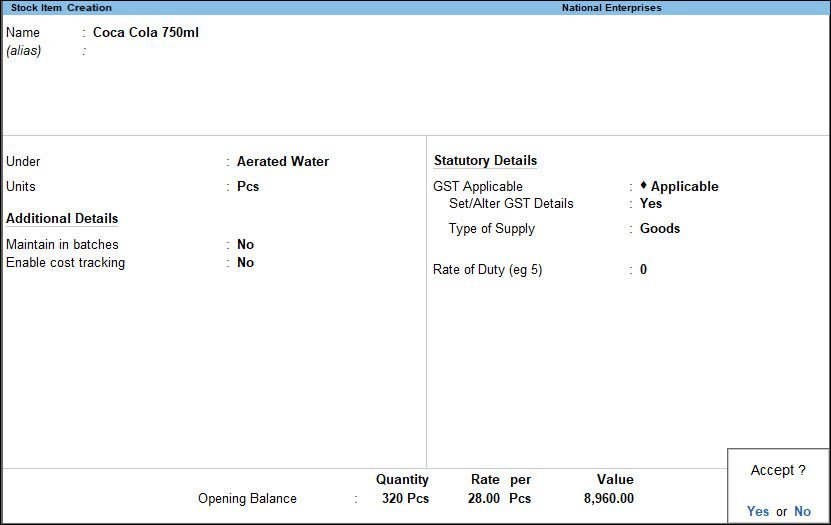
- Name: Samsung Mobile
- Under: Electronics
- Units: Nos
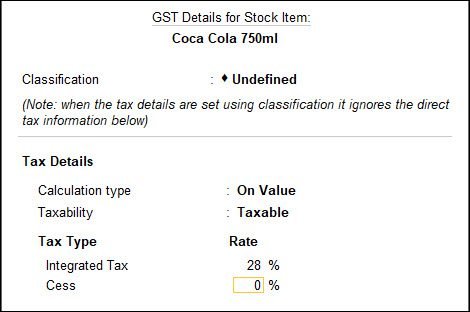
- GST Applicable: As Applicable
- HSN Code: (if GST enabled)
- Rate of GST: 18%
- Opening Quantity & Rate (if any)
- Accept (Yes)
🎉 आपका Stock Item create हो गया!
Godown / Location Wise Stock (Optional)
अगर आपके पास multiple stores हैं:
- Create → Godown
- फिर Stock Item में Godown wise quantity maintain कर सकते हैं।
Stock Item में GST कैसे सेट करें?
- Stock Item screen में
- GST Applicable: Yes
- HSN Code डालें
- Tax Rate select करें
👉 इससे sales/purchase voucher में GST auto calculate होगा।
Stock Item Creation में Common Mistakes
❌ Unit select न करना
❌ Wrong GST rate
❌ Stock Group गलत चुनना
❌ Opening stock भूल जाना
Beginners के लिए Important Tips
✔️ Similar products को same Stock Group में रखें
✔️ Units पहले create करें
✔️ GST items के लिए HSN जरूर डालें
✔️ Regular backup लेते रहें
FAQ – Stock Item Creation से जुड़े सवाल
Q1. क्या बिना Stock Group item बना सकते हैं?
👉 हाँ, लेकिन stock group use करना better है।
Q2. क्या service business में stock item जरूरी है?
👉 नहीं, service में stock item की जरूरत नहीं होती।
Q3. Opening stock बाद में change कर सकते हैं?
👉 हाँ, Stock Item alter करके change कर सकते हैं।
Conclusion
अगर आप inventory based business करते हैं, तो Stock Item Creation in TallyPrime सीखना सबसे जरूरी step है।
एक बार सही setup हो गया, तो sales, purchase और stock reports बहुत easy हो जाती हैं।
यह guide students, shopkeepers और accountants सभी के लिए useful है।